CORS Errors Explained: Fix Preflight, Credentials, and Allowed Origins the Right Way

“It works in Postman.” That was the first line of the message. A client had a headless storefront: the React front end lived on shop.example.com, the API on api.example.com. Adding to cart worked on staging, worked in Postman, worked on the developer’s laptop. In production, a few customers got a red error in the console and an empty cart. The error said something like “blocked by CORS policy: No ‘Access-Control-Allow-Origin’ header is present on the requested resource.”
It turned out to be two bugs wearing the same costume. The CDN in front of the API had cached a response that allowed the staging origin, because the server never sent Vary: Origin. And when a customer’s token expired, nginx returned a 401 without any CORS headers, so the browser reported a CORS error instead of “please log in again.” Nothing was wrong with the cart code at all.
CORS errors are some of the most searched errors in web development, and most of the fixes people paste from forums make things worse (Access-Control-Allow-Origin: * on everything, mode: "no-cors", a browser extension). In this guide I will walk through how CORS actually works, why preflight requests fail, how credentials change the rules, and the exact setups I use for Express, Next.js Route Handlers, the WordPress REST API, and nginx.
What CORS actually is (and what it is not)
Browsers enforce the same-origin policy. An origin is the scheme, host, and port together, so https://shop.example.com and https://api.example.com are different origins even though they share a domain. By default, JavaScript on one origin can send a request to another origin, but it is not allowed to read the response.
Cross-Origin Resource Sharing (CORS) is how the server tells the browser, “this other origin is allowed to read my responses.” It is a set of HTTP response headers, mainly:
Access-Control-Allow-Origin– which origin may read the responseAccess-Control-Allow-Methods– which methods are allowed (used on preflight)Access-Control-Allow-Headers– which request headers are allowed (used on preflight)Access-Control-Allow-Credentials– whether cookies and HTTP auth are allowedAccess-Control-Expose-Headers– which response headers JavaScript may readAccess-Control-Max-Age– how long the browser may cache a preflight result
Two things follow from this, and they clear up most confusion:
- CORS is enforced by the browser, not the server. Postman, curl, and your backend do not care about CORS at all. “It works in Postman” tells you the API is up, not that CORS is configured.
- CORS does not protect your server. Setting an allowed origin only controls which web pages can read responses in a browser. Anyone can still call your API from a script. Authentication, authorization, CSRF protection, and rate limiting are separate jobs.
Read the console, then reproduce with curl
When a CORS check fails, JavaScript only gets a generic TypeError: Failed to fetch. For security reasons the browser does not hand your code the reason. The real explanation is in the DevTools console, and it is usually specific: missing header, wrong origin, wildcard with credentials, preflight did not return an ok status, and so on.
My debugging routine is always the same:
- Read the full console message, not just the first line.
- In the Network tab, look for an
OPTIONSrequest right before the failing request. If it exists, the problem is often the preflight, not the real request. - Reproduce the preflight with curl so I can see exactly what the server sends back:
curl -i -X OPTIONS https://api.example.com/cart \
  -H "Origin: https://shop.example.com" \
  -H "Access-Control-Request-Method: POST" \
  -H "Access-Control-Request-Headers: content-type, authorization"
If the response is not a 2xx, or Access-Control-Allow-Origin does not echo https://shop.example.com, or Access-Control-Allow-Headers is missing authorization, you have found your bug without guessing.
Simple requests vs preflight requests
Not every cross-origin request gets a preflight. The browser sends some requests directly. The Fetch spec does not use the old name anymore, but most docs still call them “simple requests.” A request skips the preflight only when all of these are true:
- The method is
GET,HEAD, orPOST. - You only set CORS-safelisted request headers:
Accept,Accept-Language,Content-Language,Content-Type, and a single-rangeRange. Content-Type, if set, isapplication/x-www-form-urlencoded,multipart/form-data, ortext/plain.- No upload progress listeners on
XMLHttpRequestand noReadableStreambody.
That means the most normal API call in a modern app triggers a preflight:
const res = await fetch("https://api.example.com/cart", {
  method: "POST",
  headers: {
    "Content-Type": "application/json", // not safelisted -> preflight
    Authorization: `Bearer ${token}`,    // custom header -> preflight
  },
  body: JSON.stringify({ sku: "TSHIRT-M", qty: 1 }),
});
Before sending that POST, the browser sends an OPTIONS request with three headers that describe what it wants to do:
OPTIONS /cart HTTP/1.1
Host: api.example.com
Origin: https://shop.example.com
Access-Control-Request-Method: POST
Access-Control-Request-Headers: authorization, content-type
The server has to answer that question correctly, and only then does the real request go out:
HTTP/1.1 204 No Content
Access-Control-Allow-Origin: https://shop.example.com
Access-Control-Allow-Methods: GET, POST, OPTIONS
Access-Control-Allow-Headers: Authorization, Content-Type
Access-Control-Max-Age: 7200
Vary: Origin
Answering the preflight correctly
Most “preflight failed” errors come from one of these, in roughly this order of frequency on client projects I have inherited:
- Auth middleware blocks OPTIONS. Preflight requests never include cookies or your
Authorizationheader. If your auth layer returns 401 or redirects to/loginfor every unauthenticated request, it rejects the preflight before your CORS code runs. LetOPTIONSthrough before auth. This bites a lot of Next.js apps where a Proxy (Middleware) redirect runs on API paths. - The preflight gets a redirect. An
httptohttpsredirect, a missing trailing slash, or awwwredirect on the API host. Not every browser follows redirects on preflighted requests, so call the final URL directly. - Non-2xx status. The preflight needs an ok status (200-299). A 404 because no route handles
OPTIONS, or a 405 from a framework, fails the check. 204 No Content is the usual choice. - Allowed headers do not match. If the browser asks for
authorization, content-type, idempotency-keyand you only allowContent-Type, Authorization, the request is blocked. Every custom header your frontend sends must be listed. - Max-Age that does nothing.
Access-Control-Max-Agedefaults to 5 seconds. Browsers also cap it: Chromium at 7200 seconds (2 hours) and Firefox at 86400 seconds (24 hours). Setting 86400 is fine, just know Chrome will treat it as 7200.
If your API sees a lot of traffic, a sensible Max-Age is an easy win. Every preflight is an extra round trip before the real request, and on mobile networks that is noticeable.
Credentials: cookies, the wildcard, and SameSite
By default, fetch() uses credentials: "same-origin", so cookies are not sent on cross-origin requests. If your API uses cookie sessions, the frontend has to opt in:
const res = await fetch("https://api.example.com/me", {
  credentials: "include", // XHR / axios equivalent: withCredentials = true
});
The moment credentials are involved, the server rules get stricter:
- The response must include
Access-Control-Allow-Credentials: true, or the browser hides it from your code. Access-Control-Allow-Originmust be the exact origin.*is rejected with credentials.*inAccess-Control-Allow-Headers,Access-Control-Allow-Methods, andAccess-Control-Expose-Headersis treated as a literal name, not a wildcard, on credentialed requests. List things explicitly.- A
Set-Cookieon a response whoseAccess-Control-Allow-Originis*will not set the cookie. - The preflight itself never carries credentials, but its response must still say
Access-Control-Allow-Credentials: truefor the real request to go ahead.

CORS also does not override cookie rules. A cookie only goes along if its own attributes and the browser’s cookie policy allow it. Here is the distinction that saves hours: shop.example.com to api.example.com is cross-origin but same-site, because they share the registrable domain example.com. A SameSite=Lax session cookie on the API is still sent with credentials: "include". If the frontend lives on a completely different domain, the cookie needs SameSite=None; Secure, and even then Safari and Firefox block or partition third-party cookies by default. For that setup I usually move to token auth in an Authorization header, or put the API behind the same site.
Allowlists, Vary: Origin, and the CDN trap
Access-Control-Allow-Origin takes exactly one value. You cannot list two origins in it, so the standard pattern is an allowlist on the server that echoes the request’s Origin when it matches:
const ALLOWED_ORIGINS = new Set([
  "https://shop.example.com",
  "https://staging.shop.example.com",
]);

function corsOrigin(origin) {
  return origin && ALLOWED_ORIGINS.has(origin) ? origin : null;
}
Two rules I treat as non-negotiable:
- Compare exact strings, never loose patterns. A regex like
/example\.com$/also matcheshttps://notexample.com. A check likeorigin.includes("example.com")matcheshttps://example.com.attacker.dev. If you need subdomains, anchor the whole thing:/^https:\/\/([a-z0-9-]+\.)?example\.com$/. And never allowlist the stringnull; sandboxed iframes andfile://pages sendOrigin: null. - Send
Vary: Originwhenever the answer depends on the origin. This is what broke my client’s cart. Without it, a CDN or browser cache can store a response withAccess-Control-Allow-Origin: https://staging.shop.example.comand serve it to production visitors. Their browser sees the wrong origin and blocks the response.Vary: Origintells every cache to keep separate copies per origin.
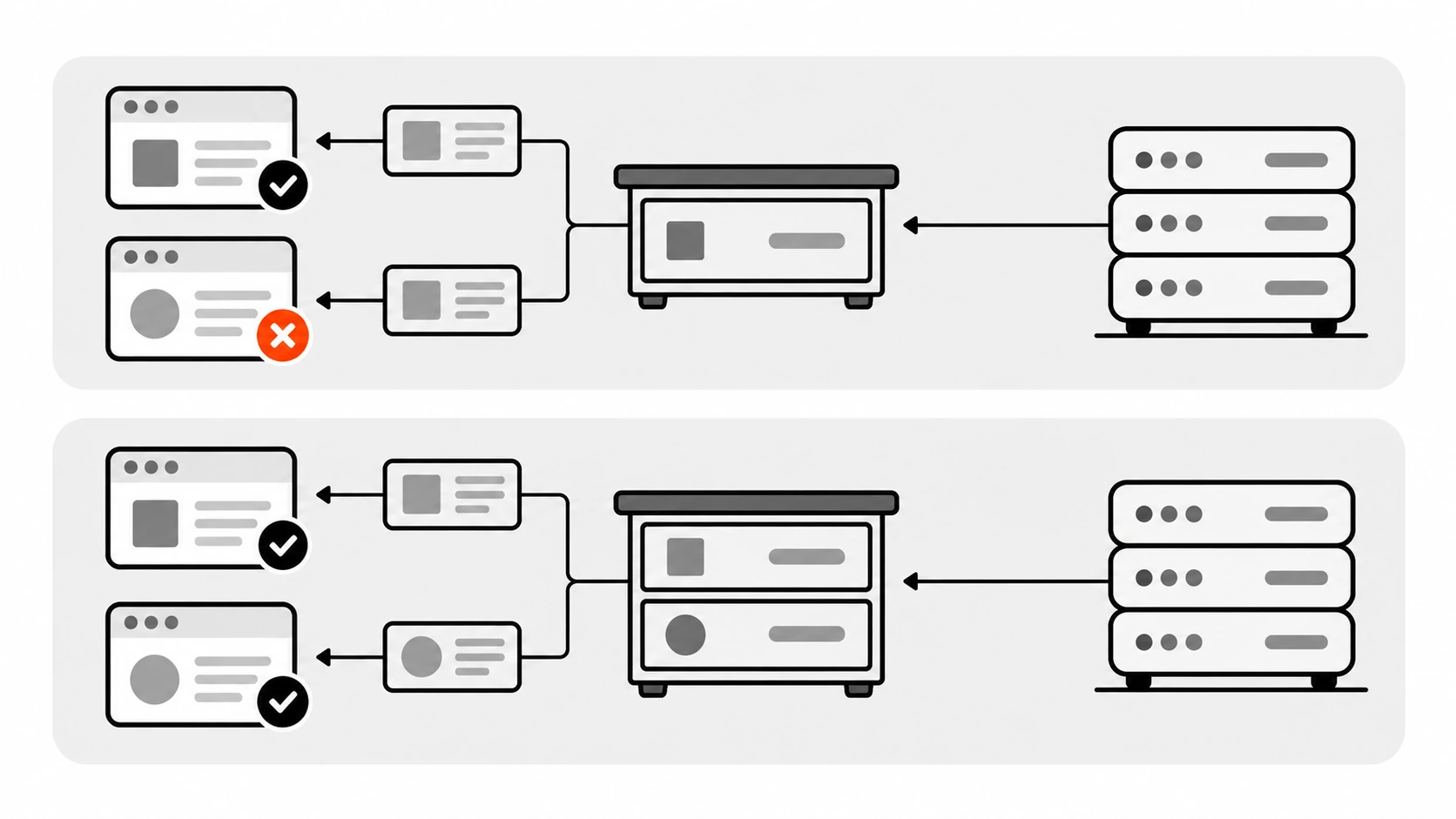
If a public endpoint truly serves anyone without credentials, Access-Control-Allow-Origin: * is fine and actually more cache-friendly, because the response is the same for everybody. Fonts on a CDN and a public read-only JSON feed are good examples. The trouble starts when * gets copied onto authenticated endpoints.
Errors that only look like CORS errors
A large share of “CORS errors” I debug are really server errors with missing headers. If your API returns a 401, 403, 404, or 500 without CORS headers, the browser cannot let your code read it, so you see a CORS message and never the real status.
On nginx this happens by default. add_header only applies to 200, 201, 204, 206, 301, 302, 303, 304, 307, and 308 responses unless you add the always parameter:
map $http_origin $cors_origin {
    default "";
    "https://shop.example.com"         $http_origin;
    "https://staging.shop.example.com" $http_origin;
}

server {
    location /api/ {
        add_header Access-Control-Allow-Origin      $cors_origin always;
        add_header Access-Control-Allow-Credentials "true" always;
        add_header Vary                             "Origin" always;
        proxy_pass http://app_upstream;
    }
}
nginx skips a header whose value is empty, so an origin that is not in the map simply gets no Access-Control-Allow-Origin at all.
Two more nginx details that cause surprises. First, add_header directives are only inherited from the outer level if the current level defines none, so one extra add_header inside a location can silently remove all your server-level CORS headers. Second, decide where CORS lives. If nginx adds Access-Control-Allow-Origin and your app adds it too, the browser receives two values and rejects the response with a “multiple values” error. Pick one layer.
Expose the headers your frontend reads
Even when the request succeeds, response.headers.get("X-Total-Count") can return null. Cross-origin JavaScript can only read the CORS-safelisted response headers by default: Cache-Control, Content-Language, Content-Length, Content-Type, Expires, Last-Modified, and Pragma. Everything else, such as pagination counts, rate limit headers, or a request id, needs to be listed:
Access-Control-Expose-Headers: X-Total-Count, X-Request-IdThis one is sneaky because the Network tab shows the header. The browser received it; it just will not give it to your script.
Setup recipes I actually use
Express with the cors package
The cors middleware handles preflights for you (it responds with 204 by default) and adds Vary: Origin when it reflects an origin:
import express from "express";
import cors from "cors";

const ALLOWED_ORIGINS = new Set([
  "https://shop.example.com",
  "https://staging.shop.example.com",
]);

const app = express();

app.use(cors({
  origin(origin, callback) {
    // true reflects the request origin, false sends no CORS headers
    callback(null, Boolean(origin) && ALLOWED_ORIGINS.has(origin));
  },
  credentials: true,
  methods: ["GET", "POST", "PATCH", "DELETE"],
  allowedHeaders: ["Content-Type", "Authorization", "Idempotency-Key"],
  exposedHeaders: ["X-Total-Count", "X-Request-Id"],
  maxAge: 7200,
}));
Register it before your auth middleware so preflights never hit the login check. If you leave out allowedHeaders, the package reflects whatever the browser asks for, which is convenient but looser than I like on authenticated APIs.
Next.js Route Handlers
Route Handlers support an OPTIONS export. If you do not define one, Next.js answers OPTIONS automatically with an Allow header, but that automatic response does not include your CORS headers. For a cross-origin API route, I define it myself:
// app/api/cart/route.ts
const ALLOWED_ORIGINS = new Set([
  "https://shop.example.com",
  "https://staging.shop.example.com",
]);

function corsHeaders(origin: string | null): Headers {
  const headers = new Headers({ Vary: "Origin" });
  if (origin && ALLOWED_ORIGINS.has(origin)) {
    headers.set("Access-Control-Allow-Origin", origin);
    headers.set("Access-Control-Allow-Credentials", "true");
  }
  return headers;
}

export async function OPTIONS(request: Request) {
  const headers = corsHeaders(request.headers.get("origin"));
  headers.set("Access-Control-Allow-Methods", "GET, POST, OPTIONS");
  headers.set("Access-Control-Allow-Headers", "Content-Type, Authorization");
  headers.set("Access-Control-Max-Age", "7200");
  return new Response(null, { status: 204, headers });
}

export async function POST(request: Request) {
  const item = await request.json();
  // validate, authorize, save...
  return Response.json({ ok: true, item }, { headers: corsHeaders(request.headers.get("origin")) });
}
The Next.js docs also point to Proxy (the Next.js 16 name for Middleware) or headers() in next.config.js when many routes need the same CORS headers. If you already redirect anonymous users in Proxy, make sure OPTIONS requests on your API paths are not redirected.
WordPress REST API
Here is something many WordPress developers do not know: core already sends CORS headers on REST responses. The rest_send_cors_headers() function is attached to the rest_pre_serve_request filter, and it echoes back whatever Origin the request sent, along with Access-Control-Allow-Credentials: true and Vary: Origin. Cookie-authenticated writes are still protected because they require a valid X-WP-Nonce, but if you want only your own front ends to read the API in a browser, replace the default with an allowlist:
add_action( 'rest_api_init', function () {
    remove_filter( 'rest_pre_serve_request', 'rest_send_cors_headers' );
    add_filter( 'rest_pre_serve_request', 'dp_rest_cors_allowlist' );
}, 15 );

function dp_rest_cors_allowlist( $value ) {
    $allowed = array(
        'https://app.example.com',
        'https://staging.app.example.com',
    );
    $origin = get_http_origin();

    header( 'Vary: Origin', false );
    if ( $origin && in_array( $origin, $allowed, true ) ) {
        header( 'Access-Control-Allow-Origin: ' . $origin );
        header( 'Access-Control-Allow-Methods: OPTIONS, GET, POST, PUT, PATCH, DELETE' );
        header( 'Access-Control-Allow-Credentials: true' );
    }
    return $value;
}
Priority 15 matters: core adds its filter inside rest_api_default_filters() on rest_api_init at priority 10, so removing it earlier does nothing. Be honest with yourself about what this buys you, though. Public endpoints like posts are still readable by any server or script; the allowlist only stops other websites from reading them in a visitor’s browser.
WordPress also gives you two filters for the header lists. By default it exposes X-WP-Total, X-WP-TotalPages, and Link, and it allows Authorization, X-WP-Nonce, Content-Disposition, Content-MD5, and Content-Type. If your headless front end sends a custom header, add it:
add_filter( 'rest_allowed_cors_headers', function ( $headers ) {
    $headers[] = 'Idempotency-Key';
    return $headers;
} );
There is a matching rest_exposed_cors_headers filter for response headers your JavaScript needs to read.
Things that are not fixes
mode: "no-cors". This does not disable CORS. It gives you an opaque response with status 0 and no readable body or headers. Your code “stops erroring” because it can no longer see anything.- Setting
Access-Control-Allow-Originon the request. It is a response header. Adding it to yourfetch()headers only adds a custom header, which triggers a preflight and makes things worse. - Browser extensions or disabled web security. They hide the problem on your machine only. Your users still get the error.
*everywhere. It fails the moment you add cookies, and on authenticated APIs it is the wrong mental model anyway.
During local development, a same-origin dev proxy (for example Vite’s server.proxy or a Next.js rewrite) is a perfectly good way to avoid CORS entirely. Just remember production still needs a real decision, because the proxy only exists on your laptop.
My CORS checklist
- Decide which layer owns CORS (app, framework, or nginx/CDN) and keep it in one place.
- Use an exact-match origin allowlist; echo the matching origin; never allow
null. - Send
Vary: Originon every response whose CORS headers depend on the origin. - Answer
OPTIONSwith 204, before auth, with no redirects. - List every custom request header in
Access-Control-Allow-Headers. - With cookies:
credentials: "include"on the client,Access-Control-Allow-Credentials: trueand an explicit origin on the server, correctSameSiteon the cookie. - Add CORS headers to error responses too (
alwayson nginx), so a 401 looks like a 401. - Expose the response headers your frontend actually reads.
- Set
Access-Control-Max-Age(up to 7200 is what Chrome will honor). - Test the preflight with curl before blaming the frontend.
Wrapping up
CORS feels random until you see the shape of it: the browser asks a question, the server answers with headers, and the browser decides whether your JavaScript gets to read the result. Almost every CORS error is the server answering the wrong question, answering too late (after auth), answering from a stale cache, or not answering at all on an error response.
My client’s cart bug took a two-line fix in the end: Vary: Origin on the API responses and always on the nginx headers. The expensive part was the day spent changing frontend code that was never broken. Next time you see “blocked by CORS policy,” run the curl preflight first. It will usually tell you exactly which header is missing.