Cursor Pagination vs Offset Pagination: How to Page Through an API Properly
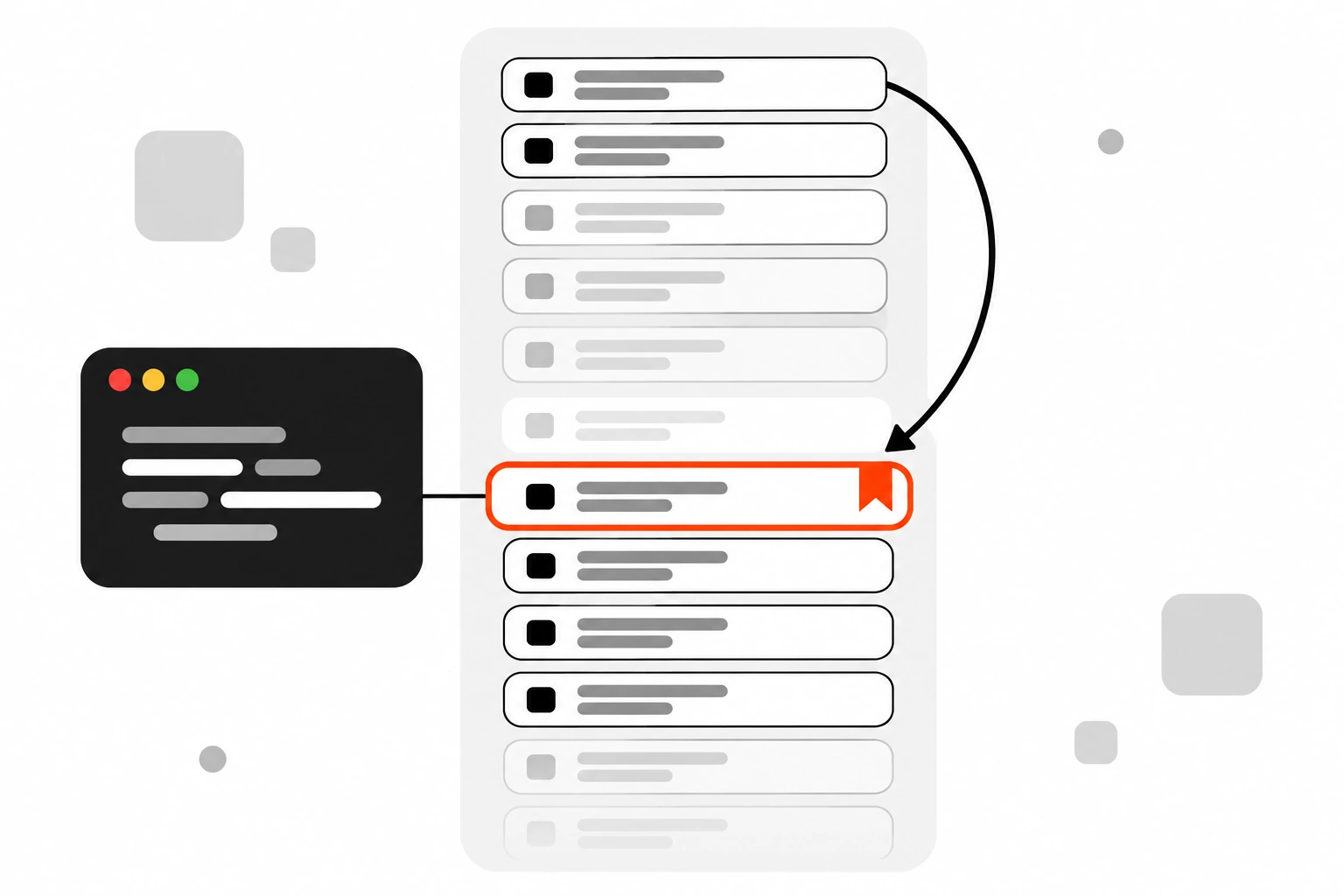
Cursor pagination is the thing I wish I’d learned before my first “page 4,000 is timing out” bug. Most APIs start with ?page=2&limit=20 because it’s easy, and for a small table it works fine. Then the table grows, rows get inserted while people scroll, and users start seeing the same item twice or missing one entirely.
This post walks through both approaches: how offset pagination works, why it gets slow and inconsistent, how cursor pagination (also called keyset pagination) fixes that, and how to build it in SQL, Node.js and Next.js without painting yourself into a corner. I’ll also cover when offset is still the right call, because it often is.
Key takeaways
- Offset pagination skips N rows and returns the next batch. It’s simple and supports “jump to page 7”, but large offsets get slow and rows can repeat or vanish when data changes.
- Cursor pagination remembers the last row you saw and asks for rows after it. It stays fast at any depth and doesn’t skip or duplicate rows when new data arrives.
- Always sort by a unique, stable key. Pair a timestamp with the primary key, like
(created_at, id), so ties never break your pages.- Make cursors opaque. Encode them as base64 so clients can’t build or edit them, and you can change the format later.
- Cap the page size, return a
next_cursororhas_morefield, and index the exact columns you sort by.- Keep offset for admin tables and small datasets where users need page numbers and totals.
Short answer: use offset pagination for small, mostly static lists where people need page numbers. Use cursor pagination for feeds, large tables, infinite scroll and public APIs, because it stays fast at any depth and doesn’t repeat or skip rows when new records are added while someone is paging through results.
What is offset pagination?
Offset pagination is a way of splitting results into pages by telling the database how many rows to skip and how many to return, usually with LIMIT and OFFSET in SQL. Page 3 with 20 items per page means skip 40 rows and return the next 20. It’s the default in most frameworks and tutorials.
On the API side it usually looks like ?page=3&per_page=20 or ?offset=40&limit=20. On the database side it looks like this:
SELECT id, title, created_at
FROM posts
ORDER BY created_at DESC
LIMIT 20 OFFSET 40;
The WordPress REST API is a good real example. Its pagination docs describe page, per_page and offset parameters, cap per_page at 100, and return two headers, X-WP-Total and X-WP-TotalPages, so clients know how many pages exist.
That’s the big selling point. You get page numbers, you get a total, and you can jump straight to page 12. For a lot of interfaces, that’s exactly what users want.
Why does offset pagination get slow on large tables?
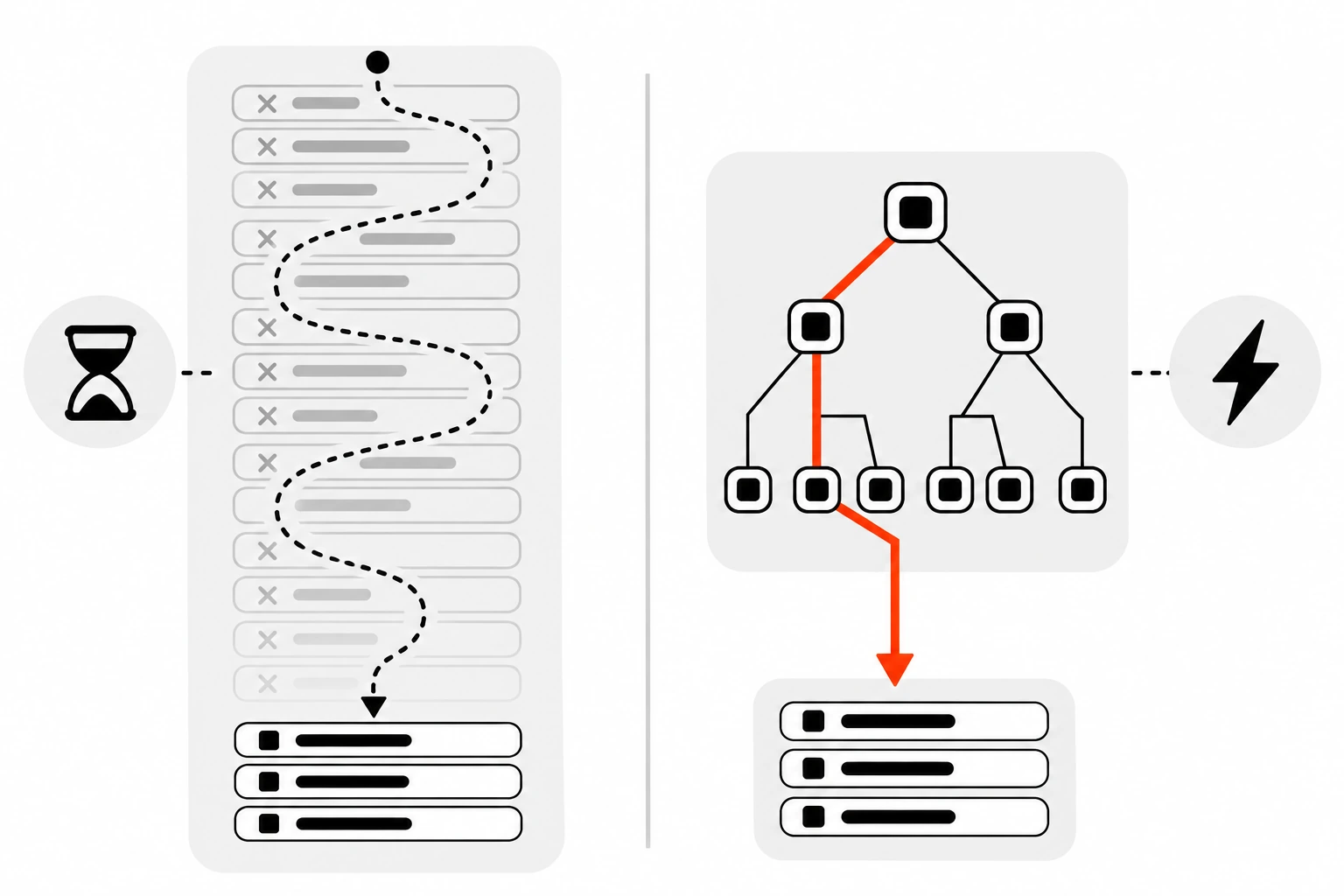
Offset pagination gets slow because the database still has to find and step over every skipped row before it returns your page. An OFFSET of 100,000 means reading 100,000 rows just to throw them away. The deeper someone pages, the more work each request does, even though the page size stays the same.
This isn’t a guess or a benchmark I made up. The PostgreSQL documentation says it directly: the rows skipped by an OFFSET clause still have to be computed inside the server, so a large OFFSET might be inefficient.
Page 1 is cheap. Page 5,000 isn’t. You usually won’t see it in development because your local table has 300 rows. You see it in production, on the endpoint a scraper or a sync job hits all night.
There’s a second cost that people forget. If your UI shows “Page 3 of 812”, something has to count all the rows. On big filtered tables, that COUNT(*) can be as expensive as the page query itself.
Why do offset pages show duplicate or missing items?
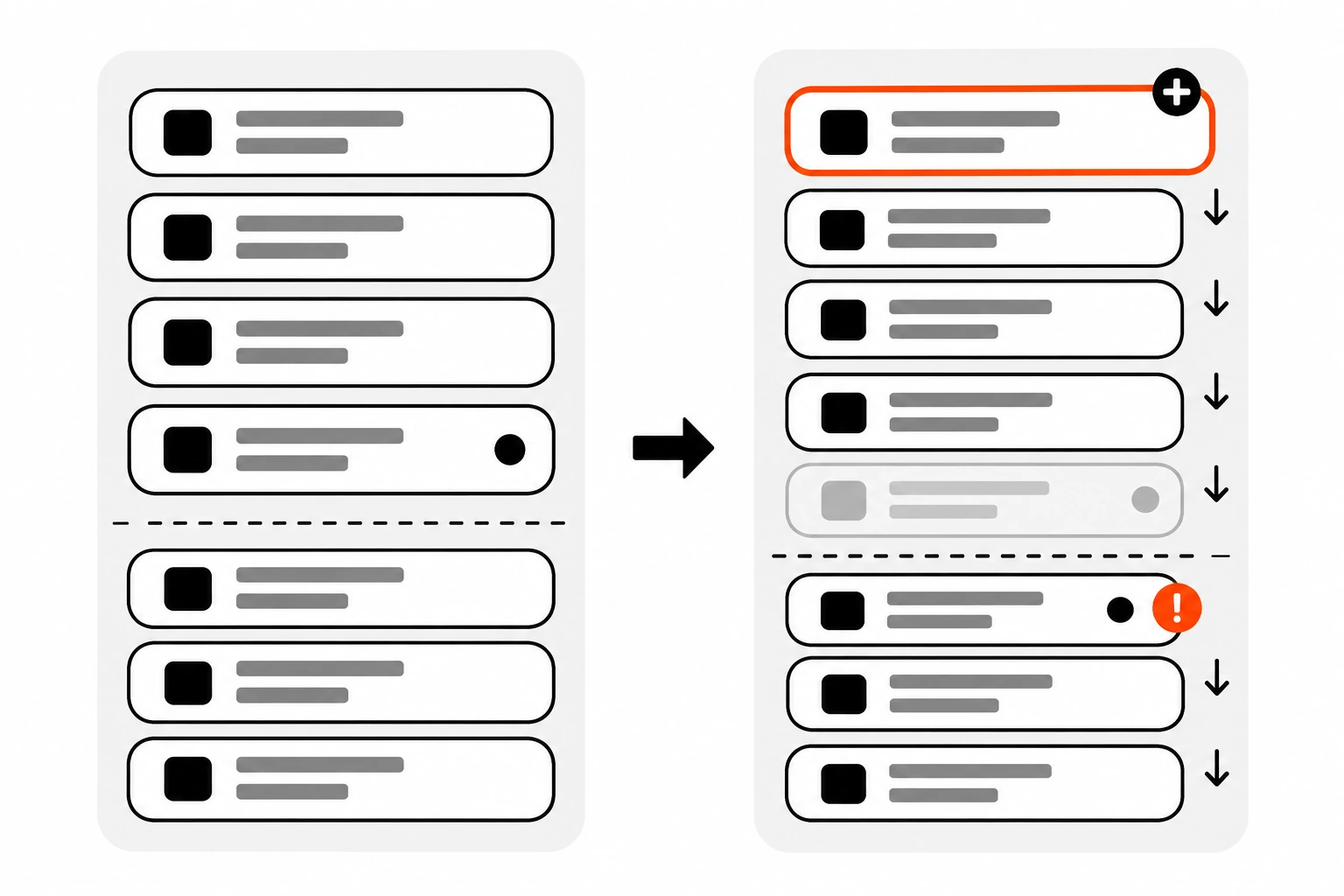
Offset pages show duplicates or gaps because the offset is counted against a list that keeps changing. If a new row is inserted at the top while a user moves from page 1 to page 2, every row shifts down by one, so the last item of page 1 appears again at the top of page 2.
Deletes cause the opposite problem. Remove one row from page 1 and the first item that should have been on page 2 slides up into page 1, which the user already loaded. They never see it.
On a social feed or a notification list, this happens all the time. New items arrive constantly, and that’s exactly where people scroll deepest.
There’s also an ordering trap. PostgreSQL’s docs warn that without an ORDER BY that gives the rows a unique order, LIMIT and OFFSET can return an unpredictable subset. If 50 posts share the same created_at value, the database is free to return them in a different order on each request. Sort by something unique, or pages will overlap even when nothing changes.
What is cursor pagination?
Cursor pagination is a way of paging through results by pointing at the last item the client received and asking for the rows that come after it. Instead of “skip 40 rows”, the query says “give me 20 rows older than this one”. The pointer is called a cursor, and it’s usually an encoded sort key.
You’ll also hear it called keyset pagination or seek pagination. Strictly speaking, keyset is the database technique and cursor is the API contract on top of it, but in practice people use the terms loosely.
Stripe is the classic example. Its list endpoints take limit, starting_after and ending_before. You pass the ID of the last object you got as starting_after, and the response includes a has_more boolean that tells you whether to keep going. GitHub’s REST API takes a similar approach on some endpoints, using before and after parameters and a link header with rel="next".
The SQL version uses a WHERE clause instead of OFFSET:
SELECT id, title, created_at
FROM posts
WHERE (created_at, id) < ($1, $2)
ORDER BY created_at DESC, id DESC
LIMIT 20;
$1 and $2 are the created_at and id of the last row on the previous page. With an index on (created_at, id), the database jumps straight to that spot and reads 20 rows. Page 5,000 costs about the same as page 1.
How does cursor pagination differ from offset pagination?
Cursor pagination differs from offset pagination in how it finds the next page. Offset counts rows from the start, so cost grows with depth and inserts shift results. Cursor pagination seeks to a known row using an index, so cost stays flat and new rows don’t push items between pages. The trade-off is losing random page jumps.
Here’s how I compare them when I’m picking one for a new endpoint:
| Factor | Offset pagination | Cursor pagination |
|---|---|---|
| Request shape | ?page=3&per_page=20 | ?cursor=eyJ...&limit=20 |
| Speed on deep pages | Slows down as the offset grows | Stays about the same at any depth |
| Rows inserted or deleted mid-scroll | Can duplicate or skip items | Stable, no repeats or gaps |
| Jump to page 12 | Yes | No, only next and previous |
| Total count and page numbers | Easy to show | Usually skipped |
| Sorting by any column | Easy | Needs a unique, indexed sort key |
| Best for | Admin tables, small lists, search pages | Feeds, infinite scroll, sync jobs, public APIs |
Neither one wins everywhere. If your list has a few thousand rows and users want “Page 3 of 9”, offset is fine and simpler. If it’s an activity feed with millions of rows, cursor pagination saves you from a slow endpoint later.
How do you build cursor pagination in SQL?
To build cursor pagination in SQL, sort by a unique combination of columns, index those columns in the same order, and filter with a row comparison against the last row’s values. Fetch one extra row beyond the page size so you know whether another page exists without running a separate count query.
Step by step, this is what I do:
- Pick the sort order. For a feed, that’s newest first:
created_at DESC, id DESC. - Add the primary key as a tiebreaker so the order is unique, even when two rows share a timestamp.
- Create a composite index that matches the sort, like
CREATE INDEX posts_created_id_idx ON posts (created_at DESC, id DESC);. - On the first request, run the query without the
WHEREfilter. - Ask for
limit + 1rows. If you get the extra one, there’s a next page. Drop it before returning. - Build the next cursor from the last row you actually return.
The row comparison (created_at, id) < ($1, $2) works in PostgreSQL and in MySQL. If your database or ORM doesn’t support it cleanly, spell it out:
WHERE created_at < $1
   OR (created_at = $1 AND id < $2)
Both forms mean the same thing. Check EXPLAIN on your real data to make sure the index is used, because the expanded version sometimes trips up older query planners.
How do you encode a cursor safely?
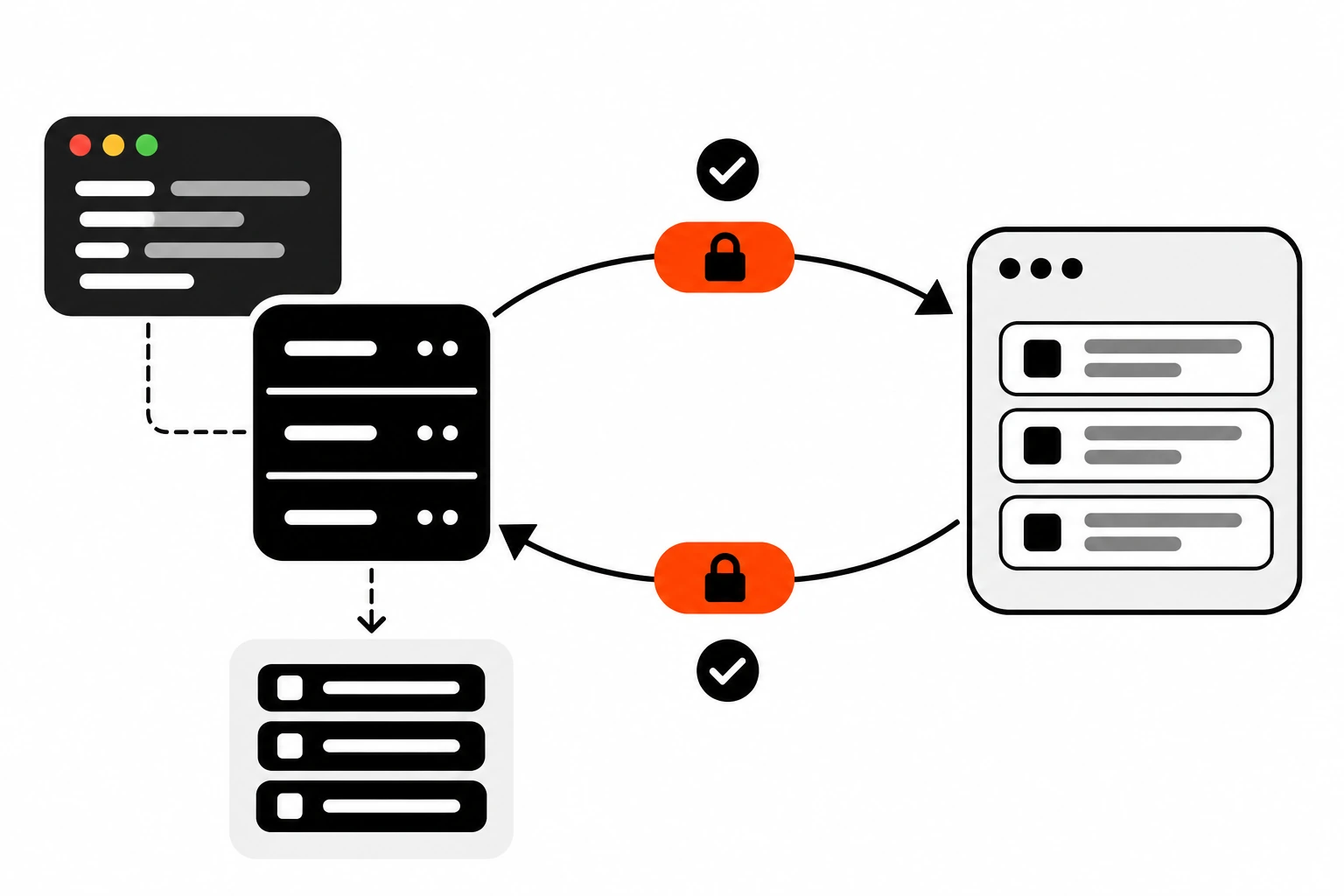
Encode a cursor by packing the sort values of the last row into a small JSON object and base64url encoding it. Treat it as opaque: clients pass it back unchanged and never build it themselves. On the server, decode it, validate every field, and reject anything malformed with a 400 response.
Here’s a small Node.js helper I reuse:
export function encodeCursor(row) {
  const payload = { t: row.created_at.toISOString(), id: row.id };
  return Buffer.from(JSON.stringify(payload)).toString("base64url");
}

export function decodeCursor(cursor) {
  try {
    const { t, id } = JSON.parse(Buffer.from(cursor, "base64url").toString("utf8"));
    const date = new Date(t);
    if (Number.isNaN(date.getTime()) || !Number.isInteger(id)) return null;
    return { createdAt: date, id };
  } catch {
    return null;
  }
}
Base64 isn’t security. Anyone can decode it. The point is to keep the format private so you can change it later, like adding a sort field, without breaking clients who’d otherwise be gluing cursors together by hand.
Never put anything sensitive in a cursor, and never trust it. Always run it through the same parameterized query as any other input. If you need to stop tampering completely, sign it with an HMAC, the same idea I use when I verify webhook signatures.
When a cursor fails to decode, return a clear error. I use a Problem Details response with a 400 status and a short message like “Invalid cursor”, so client developers know what went wrong.
How do you add cursor pagination to a Next.js API route?
In a Next.js App Router route handler, read the cursor and limit from the request URL, clamp the limit, decode the cursor, run the keyset query with one extra row, and return the items with a next_cursor value. Clients keep requesting until next_cursor comes back as null.
// app/api/posts/route.ts
import { NextRequest } from "next/server";
import { db } from "@/lib/db";
import { encodeCursor, decodeCursor } from "@/lib/cursor";

export async function GET(req: NextRequest) {
  const params = req.nextUrl.searchParams;
  const limit = Math.min(Math.max(Number(params.get("limit")) || 20, 1), 100);
  const raw = params.get("cursor");
  const cursor = raw ? decodeCursor(raw) : null;

  if (raw && !cursor) {
    return Response.json(
      { title: "Invalid cursor", status: 400 },
      { status: 400, headers: { "Content-Type": "application/problem+json" } }
    );
  }

  const rows = cursor
    ? await db.query(
        `SELECT id, title, created_at FROM posts
         WHERE (created_at, id) < ($1, $2)
         ORDER BY created_at DESC, id DESC LIMIT $3`,
        [cursor.createdAt, cursor.id, limit + 1]
      )
    : await db.query(
        `SELECT id, title, created_at FROM posts
         ORDER BY created_at DESC, id DESC LIMIT $1`,
        [limit + 1]
      );

  const hasMore = rows.length > limit;
  const items = hasMore ? rows.slice(0, limit) : rows;

  return Response.json({
    items,
    next_cursor: hasMore ? encodeCursor(items[items.length - 1]) : null,
  });
}
The db.query helper here is a stand-in for whatever driver you use. The pattern is what matters: clamp the limit, validate the cursor, fetch one extra row.
On the client, an infinite scroll list just stores next_cursor and sends it with the next request. When it’s null, stop loading. If you’re firing these requests from a React effect, cancel stale ones when the component unmounts, or a slow page 2 can land after page 3.
What should a paginated API response include?
A paginated API response should include the page of items, a way to fetch the next page, and a clear signal for the end of the list. With cursor pagination, that’s usually a next_cursor field that is null on the last page, or a has_more boolean, plus optionally a link header with rel="next".
A response shape I like:
{
  "items": [
    { "id": 981, "title": "Release notes", "created_at": "2026-11-04T09:12:00Z" }
  ],
  "next_cursor": "eyJ0IjoiMjAyNi0xMS0wNFQwOToxMjowMC4wMDBaIiwiaWQiOjk4MX0",
  "has_more": true
}
Some details I always add:
- A default page size and a hard maximum. GitHub and WordPress both cap at 100 for most endpoints, and silently clamping is friendlier than erroring.
- The same filters on every page. If the first request had
?status=published, the cursor must only be used with that same filter. Some APIs bake the filters into the cursor to enforce this. - A
linkheader if your API style already uses them. GitHub’s docs show how clients can followrel="next"until it disappears. - Cache rules that fit the data. The first page of a feed changes often, while deep cursor pages are stable, so they can often be cached longer. My post on Cache-Control headers covers how to set that up.
And if your list endpoint is public, put it behind sensible API rate limiting. Pagination makes it easy for one script to walk your whole table in a loop.
Can cursor pagination go backwards or jump to a page?
Cursor pagination can go backwards, but it can’t jump to an arbitrary page number. For a previous page, flip the comparison and the sort order, fetch the rows before the first item you showed, then reverse them in code. Jumping to page 40 needs offset, or a different interface like date filters.
A previous-page query for the newest-first feed looks like this:
SELECT id, title, created_at
FROM posts
WHERE (created_at, id) > ($1, $2)
ORDER BY created_at ASC, id ASC
LIMIT 20;
Then reverse the rows before sending them, so they’re still newest first. Stripe models this with ending_before, the mirror image of starting_after.
If users truly need to jump around, ask why. Usually they’re looking for something specific, and a search box, a date range or a “jump to month” filter serves them better than page 40 ever did.
When should you still use offset pagination?
Offset pagination is still the right choice when the dataset is small, changes rarely, and users need page numbers or a total count. Admin tables, search results people rarely page past, and back-office reports are good fits. If the deepest realistic page is shallow, offset’s simplicity beats cursor pagination’s complexity.
A few cases where I keep offset without guilt:
- A WordPress admin screen or custom dashboard with a few hundred records.
- Search result pages where almost nobody goes past page 3.
- Reports where the data is a fixed snapshot and doesn’t change while someone reads it.
- Any interface where “Page 3 of 9” is a real requirement from the people using it.
You can also mix them. I’ve used offset for the first few pages of a list and switched to cursors for “load more” after that. It’s more code, but it gives you page numbers where they matter and speed where it hurts.
If your WordPress site’s own queries feel slow, deep pagination is one place to look, along with the other causes in my post on WordPress TTFB.
What are the most common pagination mistakes?
The most common pagination mistakes are sorting by a non-unique column, missing an index on the sort keys, letting clients request unlimited page sizes, exposing raw database IDs as editable cursors, and running a full count on every request. Each one either breaks page consistency or slowly turns a cheap list endpoint into an expensive one.
The ones I see most in code reviews:
ORDER BY created_atalone. Ties make the order unstable, so add the primary key.- An index on
created_atbut not on(created_at, id). The keyset query then can’t seek cleanly. - No maximum
limit. Someone eventually asks for 100,000 rows. - Changing the sort or filters between pages while reusing the old cursor.
COUNT(*)on every request for a feed nobody needs a total for.- Infinite scroll that never tells screen reader users new items loaded. Announce it in a polite live region or offer a “Load more” button.
The fix for most of these is boring. Pick a stable order, index it, cap the page size, and keep the cursor opaque. Once that’s in place, pagination stops being the endpoint that wakes you up at night.
If you’re starting a new API today, my default is simple. Cursor pagination for anything that grows, offset for anything small that needs page numbers. Pick deliberately, and you won’t have to migrate a public endpoint later.