Next.js Middleware and Proxy: Auth Redirects, Rewrites, and Matchers Done Right

A client dashboard went live on a Friday. Monday morning their designer messaged me a screenshot of a white page with no CSS, no logo, and a login form floating in the middle of nowhere. The session cookie was fine. The login route was fine. Next.js Middleware was the problem: it ran on every request, including /_next/static and /_next/image, and redirected those asset requests to /login as if they were protected pages. The HTML arrived. The stylesheets never did.
We fixed it with a tight matcher, a lightweight cookie check, a safe return-path redirect, and a hard rule that every Server Action and Route Handler still authorizes on its own. That pattern is what this guide covers. I will use both names honestly: Middleware is still what most people search for and what older Next.js apps use (middleware.ts). In Next.js 16 the file convention is renamed to Proxy (proxy.ts), with a codemod to migrate. The APIs below are the same idea either way.
What Middleware (and Proxy) actually does
Think of Middleware / Proxy as a network boundary that sits in front of your App Router (or Pages Router) routes. For matching requests it can:
- Redirect the browser to another URL (
NextResponse.redirect) - Rewrite the request to a different internal path while leaving the URL bar alone (
NextResponse.rewrite) - Pass through and optionally set request or response headers / cookies (
NextResponse.next) - Return JSON directly with
Response.jsonwhen you want an early API-style answer
It is not Express middleware. It is not a place to dump your entire authorization model. It is a last-resort gate for cross-cutting concerns: auth redirects, A/B rewrites, locale routing, feature-flag headers, lightweight bot filters.
Place one file at the project root or inside src, at the same level as app or pages:
- Older Next.js:
middleware.tsexportingmiddleware(or a default export) - Next.js 16+:
proxy.tsexportingproxy(or a default export)
Only one function from that file is supported. You do not compose multiple proxies from one file the way you might stack Express handlers.
// middleware.ts (Next.js 15 and earlier) OR proxy.ts (Next.js 16+)
import { NextResponse } from "next/server";
import type { NextRequest } from "next/server";

export function middleware(request: NextRequest) {
  // In Next.js 16 docs this is: export function proxy(request: NextRequest)
  return NextResponse.next();
}

export const config = {
  matcher: ["/dashboard/:path*", "/account/:path*"],
};
If you are already on Next.js 16, rename the export to proxy and the file to proxy.ts. I show middleware in several snippets below so readers on older majors can paste without renaming first, then call out the Proxy rename near the end.
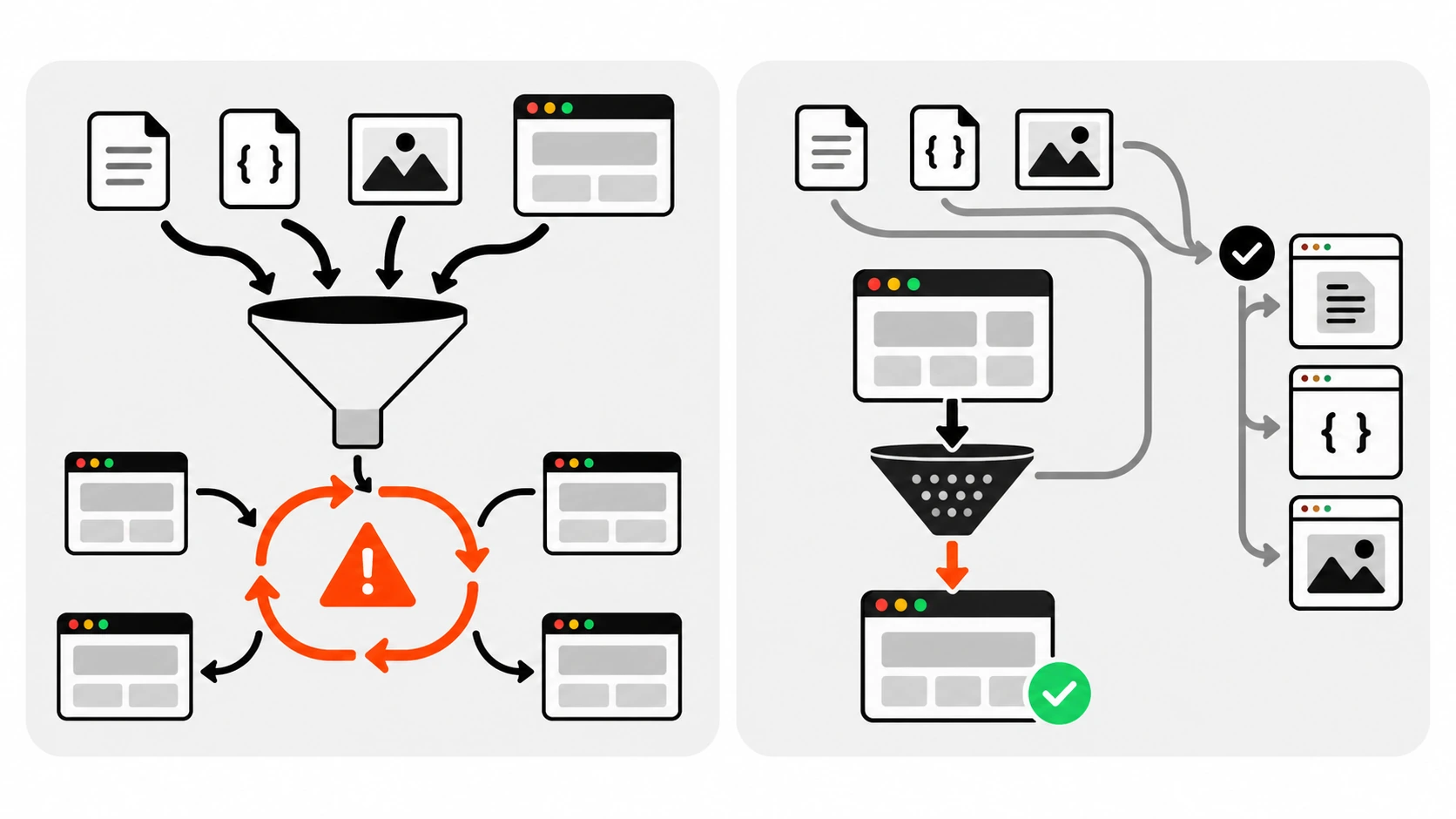
Without a matcher, static assets break
This is the bug from the opening story, and it is still the mistake I see most often in client repos.
If you omit config.matcher (or the equivalent matcher export), the function runs on every request that hits the edge of your app – including /_next/static/*, /_next/image, favicon, public folder assets, and more. An auth redirect that says “no session cookie means go to /login” will happily redirect app.css and chunk.js to the login HTML. The browser gets text/html where it expected CSS/JS. Result: unstyled login, blank dashboard, or a half-hydrated shell.
Matcher values must be build-time constants. Do not build the matcher array from runtime env vars or dynamic imports. Next needs to know the paths at build time.
A practical negative-lookahead pattern that excludes the usual static noise:
export const config = {
  matcher: [
    /*
     * Match all pathnames except:
     * - api (Route Handlers you want to skip)
     * - _next/static (static files)
     * - _next/image (image optimization)
     * - favicon.ico, sitemap.xml, robots.txt
     */
    "/((?!api|_next/static|_next/image|favicon.ico|sitemap.xml|robots.txt).*)",
  ],
};
You can also use the object form with source, locale, has, and missing (for headers, query, or cookies) when you need conditional matching.
One security detail that surprises people: even if you exclude /_next/data in the matcher, Proxy / Middleware still runs for /_next/data/* on purpose. Do not assume that exclusion means those requests skip the gate.
Auth redirect with a safe return path
For a protected dashboard I want three things:
- If there is no session cookie, send the user to
/login - Remember where they were trying to go (
?from=/dashboard/settings) - Never turn that return path into an open redirect to
evil.example
Lightweight check in Middleware / Proxy:
import { NextResponse } from "next/server";
import type { NextRequest } from "next/server";

function safeReturnPath(raw: string | null): string {
  if (!raw) return "/dashboard";
  // Only allow same-origin relative paths
  if (!raw.startsWith("/") || raw.startsWith("//") || raw.includes("://")) {
    return "/dashboard";
  }
  return raw;
}

export function middleware(request: NextRequest) {
  const session = request.cookies.get("session")?.value;
  const { pathname, search } = request.nextUrl;

  if (!session) {
    const login = new URL("/login", request.url);
    login.searchParams.set("from", pathname + search);
    return NextResponse.redirect(login);
  }

  return NextResponse.next();
}

export const config = {
  matcher: ["/dashboard/:path*", "/account/:path*"],
};
On the login page, after a successful sign-in, read from and navigate only through the same safeReturnPath helper (or equivalent allowlist). Never do window.location = searchParams.get("from") with no checks. Attackers love ?from=https://evil.example and ?from=//evil.example.
Keep the Middleware / Proxy check cheap: cookie presence, a short signed token shape check, or a HMAC you can verify without a network round trip. Full role lookups, database queries, and heavy JWT verification with JWKS fetches on every matched request will add latency to every navigation. Put the heavy authorization where the mutation or sensitive read actually happens.
Rewrite vs redirect
These two look similar in code and behave very differently for the user.
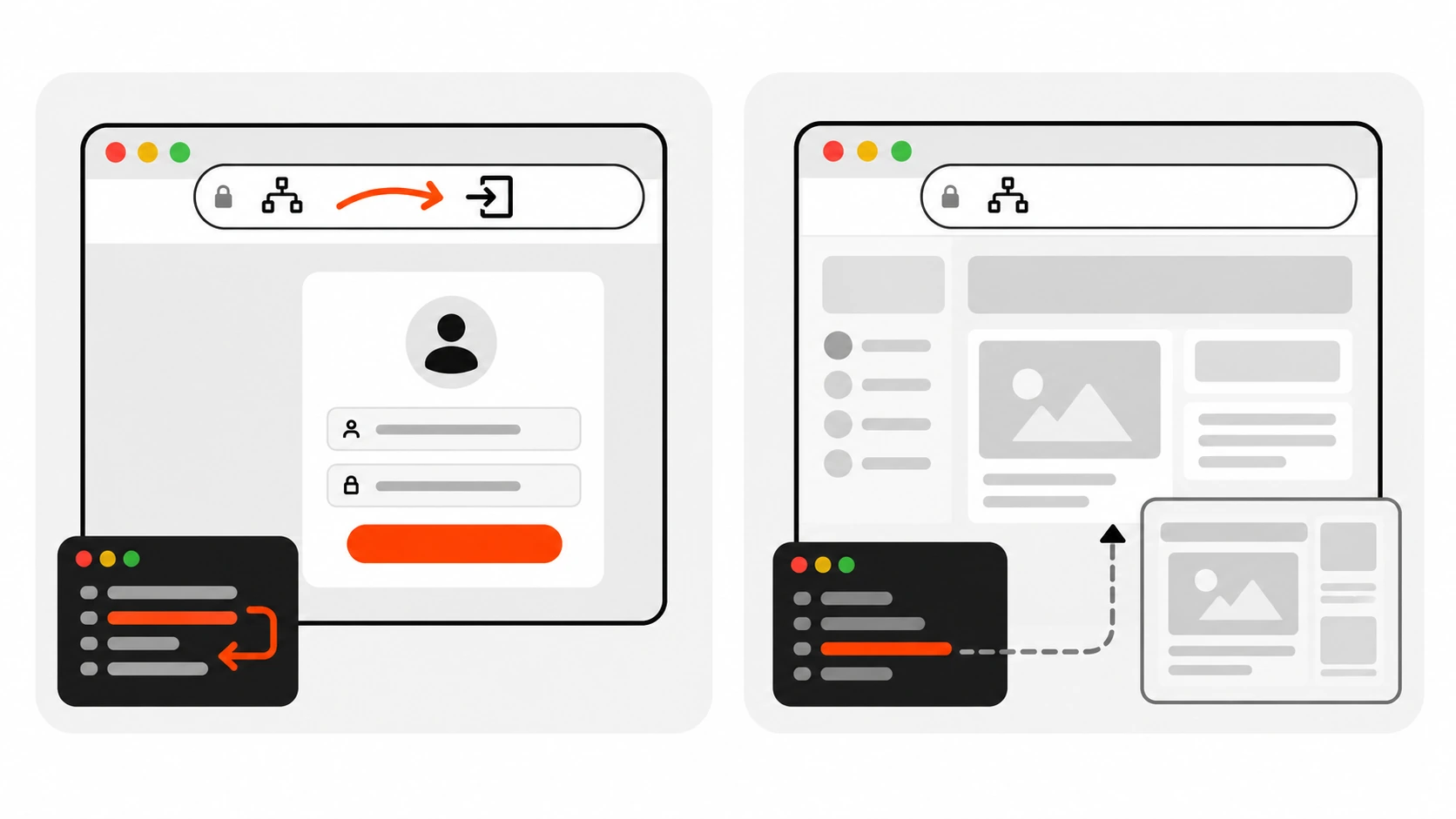
NextResponse.redirect(url)tells the browser to go somewhere else. The address bar updates. Status is a redirect (often 307/308 depending on how you construct it). Use this for login gates, locale switches the user should see, or “you moved permanently”.NextResponse.rewrite(url)keeps the browser URL the same and serves another path under the hood. Use this for A/B tests, multi-tenant vanity paths, or staging a new route without changing the public URL.
// User sees /app, server serves /dashboard
return NextResponse.rewrite(new URL("/dashboard", request.url));

// User is sent to /login; URL bar becomes /login
return NextResponse.redirect(new URL("/login", request.url));
If you rewrite when you meant to redirect, users bookmark the wrong URL and share links that do not match what they see. If you redirect when you meant to rewrite, you leak internal paths and break the vanity URL you wanted.
Request headers vs response headers
This is the second sharp edge after matchers.
When you want Middleware / Proxy to pass data upstream to Server Components, Route Handlers, or the page (for example a sanitized user id or a feature flag), you must set headers on the request via NextResponse.next({ request: { headers } }).
export function middleware(request: NextRequest) {
  const requestHeaders = new Headers(request.headers);
  requestHeaders.set("x-pathname", request.nextUrl.pathname);

  return NextResponse.next({
    request: {
      headers: requestHeaders,
    },
  });
}
If you instead do NextResponse.next({ headers: { "x-pathname": "..." } }), those headers are exposed on the response to the client, not injected into the incoming request for your React tree. Mixing those up is a common “why is my header undefined in the Server Component?” bug.
For response-only headers (security headers you want the browser to see, cache hints, and so on), set them on the response object you return. Remember the execution order from the docs:
headersfromnext.configredirectsfromnext.config- Proxy / Middleware
beforeFilesrewrites- Filesystem routes
afterFilesrewrites- Dynamic routes
- Fallback rewrites
So config-level redirects run before your Proxy. If both try to own the same path, config wins first.
Cookies on request and response
Read cookies from request.cookies. Set or delete cookies on the NextResponse you return.
export function middleware(request: NextRequest) {
  const res = NextResponse.next();
  const theme = request.cookies.get("theme")?.value ?? "system";

  // Example: refresh a short-lived preference cookie
  res.cookies.set("theme", theme, {
    path: "/",
    sameSite: "lax",
    httpOnly: false, // preference cookie readable by client JS
  });

  return res;
}
For session cookies prefer httpOnly, secure in production, and a deliberate sameSite policy. Middleware / Proxy can clear a bad cookie with res.cookies.delete("session") before redirecting to login.
Do not treat “cookie exists” as “user is allowed to delete the project”. That is the next section.
Why auth must also live in Server Actions and Route Handlers
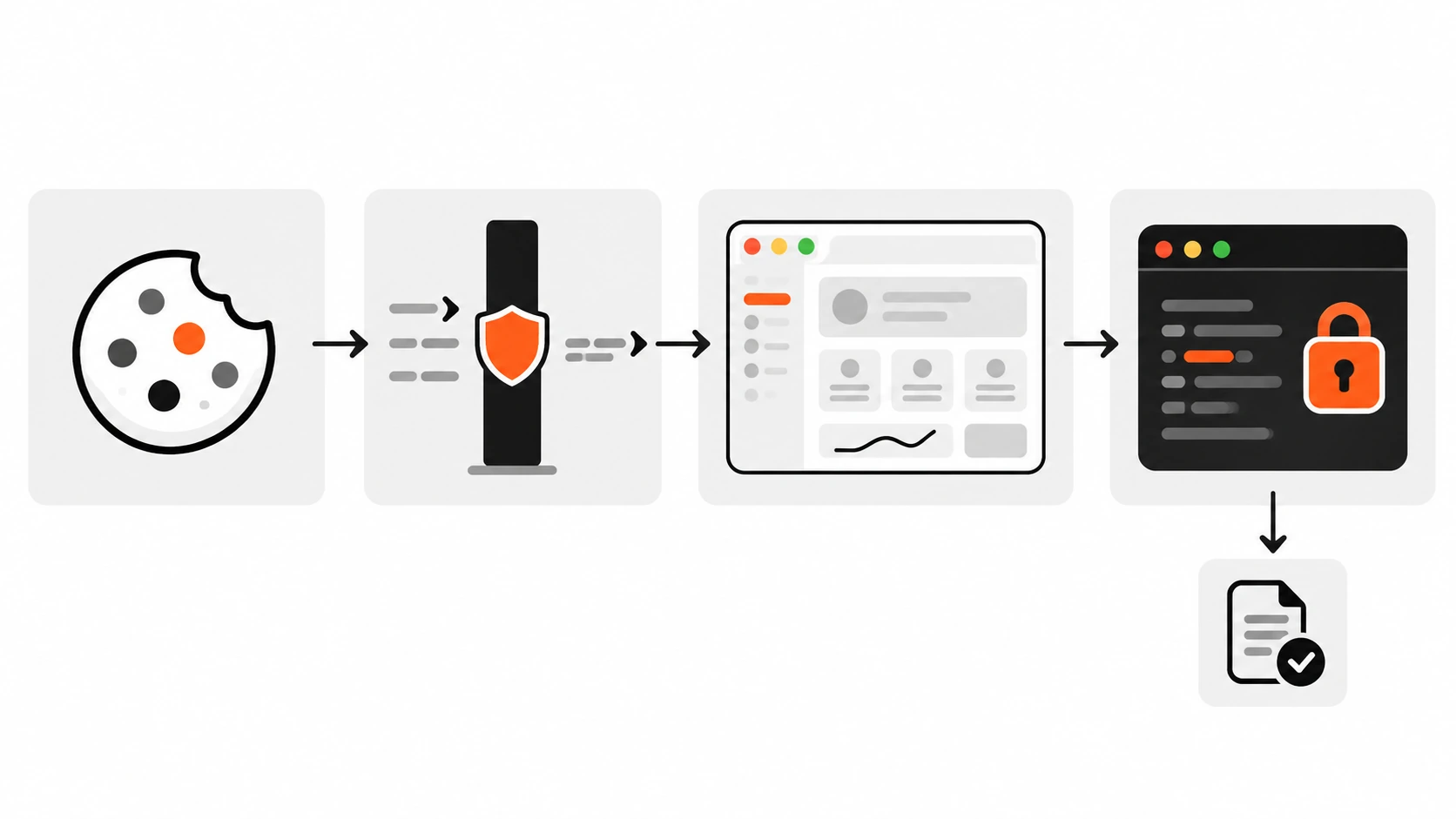
Middleware / Proxy is a gate for navigation. Server Actions and Route Handlers are where mutations and sensitive reads happen. An attacker who can POST to a Server Action (or call your Route Handler) is not limited to clicking links your matcher protects.
Also: Server Functions are POSTs to the page route. If you exclude that path from the matcher so the page itself skips Proxy, those Server Function POSTs skip Proxy too. Relying on Proxy alone is a false sense of safety.
Pattern I ship on client apps:
// app/dashboard/actions.ts
"use server";

import { cookies } from "next/headers";
import { redirect } from "next/navigation";

async function requireUser() {
  const jar = await cookies();
  const session = jar.get("session")?.value;
  if (!session) redirect("/login");
  // Verify session server-side (DB / signed token / auth library)
  const user = await getUserFromSession(session);
  if (!user) redirect("/login");
  return user;
}

export async function deleteProject(projectId: string) {
  const user = await requireUser();
  const project = await getProject(projectId);
  if (!project || project.ownerId !== user.id) {
    throw new Error("Forbidden");
  }
  await db.project.delete({ where: { id: projectId } });
}
Proxy redirects anonymous browsers away from /dashboard. requireUser() still runs inside every sensitive action. Same for Route Handlers that return private JSON.
I keep Middleware / Proxy dumb on purpose: cookie present? redirect or continue. Role checks, ownership, and business rules stay next to the data.
Runtime, waitUntil, and platform limits
Current Next.js docs default Proxy to the Node.js runtime. Setting a runtime config inside the Proxy / Middleware file throws. It runs on Node server and Docker-style deployments. It does not support static export – if you output: "export", this gate is not your tool.
For work that should not block the response (analytics, logging), use waitUntil on the event:
import type { NextFetchEvent, NextRequest } from "next/server";
import { NextResponse } from "next/server";

export function middleware(request: NextRequest, event: NextFetchEvent) {
  event.waitUntil(logRequest(request));
  return NextResponse.next();
}
There are also flags such as skipTrailingSlashRedirect and skipProxyUrlNormalize (formerly skipMiddlewareUrlNormalize) when you need to opt out of Next’s URL normalization behaviour. Reach for them only when you have a concrete breakage, not by default.
Renamed to Proxy in Next.js 16 (and the codemod)
Starting with Next.js 16.0.0, the middleware file convention is deprecated and renamed to proxy. The docs reason is clarity: “middleware” sounded like Express middleware and encouraged overuse; “proxy” better describes a network boundary in front of the app.
Migration:
npx @next/codemod@canary middleware-to-proxy .That renames the file and the middleware export to proxy. After the codemod, examples look like:
// proxy.ts
import { NextResponse } from "next/server";
import type { NextRequest } from "next/server";

export function proxy(request: NextRequest) {
  return NextResponse.next();
}

export const config = {
  matcher: ["/dashboard/:path*"],
};
For SEO and search, people still type Next.js Middleware. Teach both names in the same article so upgrades do not feel like a different product. If you maintain a long-lived app, keep a short comment at the top of proxy.ts pointing back to the old name for teammates who have not read the 16 release notes.
My Middleware / Proxy checklist
Before I merge a gate PR I tick these:
- Matcher is present and constant. Static assets and image optimizer paths are excluded.
- Auth redirect only checks something cheap (cookie / short token), not a full DB role tree.
- Return path (
from) is validated as a same-origin relative path – no open redirects. - Sensitive Server Actions and Route Handlers call their own
requireUser/ auth helper. - Request headers use
NextResponse.next({ request: { headers } }), not response-onlyheaders. - I know whether I need
redirect(URL changes) orrewrite(URL stays). - I am not putting
runtimeconfig in the Proxy file. - Static export is not enabled if we depend on this gate.
- On Next.js 16, file and export use
proxy(or the codemod has been run). - Team knows
/_next/datamay still hit the gate even when excluded from the matcher string.
Common mistakes (and the fix)
- No matcher – Static assets redirect to login. Fix: add a negative-lookahead or explicit protected paths.
- Proxy-only authorization – Mutations still succeed for forged POSTs. Fix: authorize in Server Actions / Route Handlers.
- Wrong header shape – Upstream never sees your custom header. Fix: nest under
request: { headers }. - Heavy work on every request – Dashboard feels slow. Fix: move JWT/JWKS and role DB lookups out of the hot path.
- Open redirect via
from– Phishing after login. Fix: allow only relative paths starting with a single/. - Rewrite when you meant redirect – URL bar lies to users. Fix: pick the API that matches the UX.
- Assuming
_next/datais skipped – Surprise runs of your gate. Fix: design the function to be safe if it still runs. - Ignoring the rename – New hires look for
middleware.tson a 16 app. Fix: document Proxy + run the codemod.
Wrapping up
Next.js Middleware (Proxy in Next.js 16) is excellent at one job: sitting on the network boundary and making fast, boring decisions – redirect anonymous users, rewrite a vanity path, attach a header, refresh a cookie. It is a poor place to hide your entire security model.
Start with a tight matcher so you never break CSS again. Redirect to login with a sanitized return path. Prefer rewrite only when the public URL must stay put. Set request headers the documented way. Keep cookies and session checks light at the edge, and always re-check auth where the data lives.
If your dashboard ever loaded as a white page with a lonely login form, check the matcher first. That one config object has saved me more Friday-evening fires than any clever JWT trick.