Web Workers: How to Move Heavy JavaScript Off the Main Thread
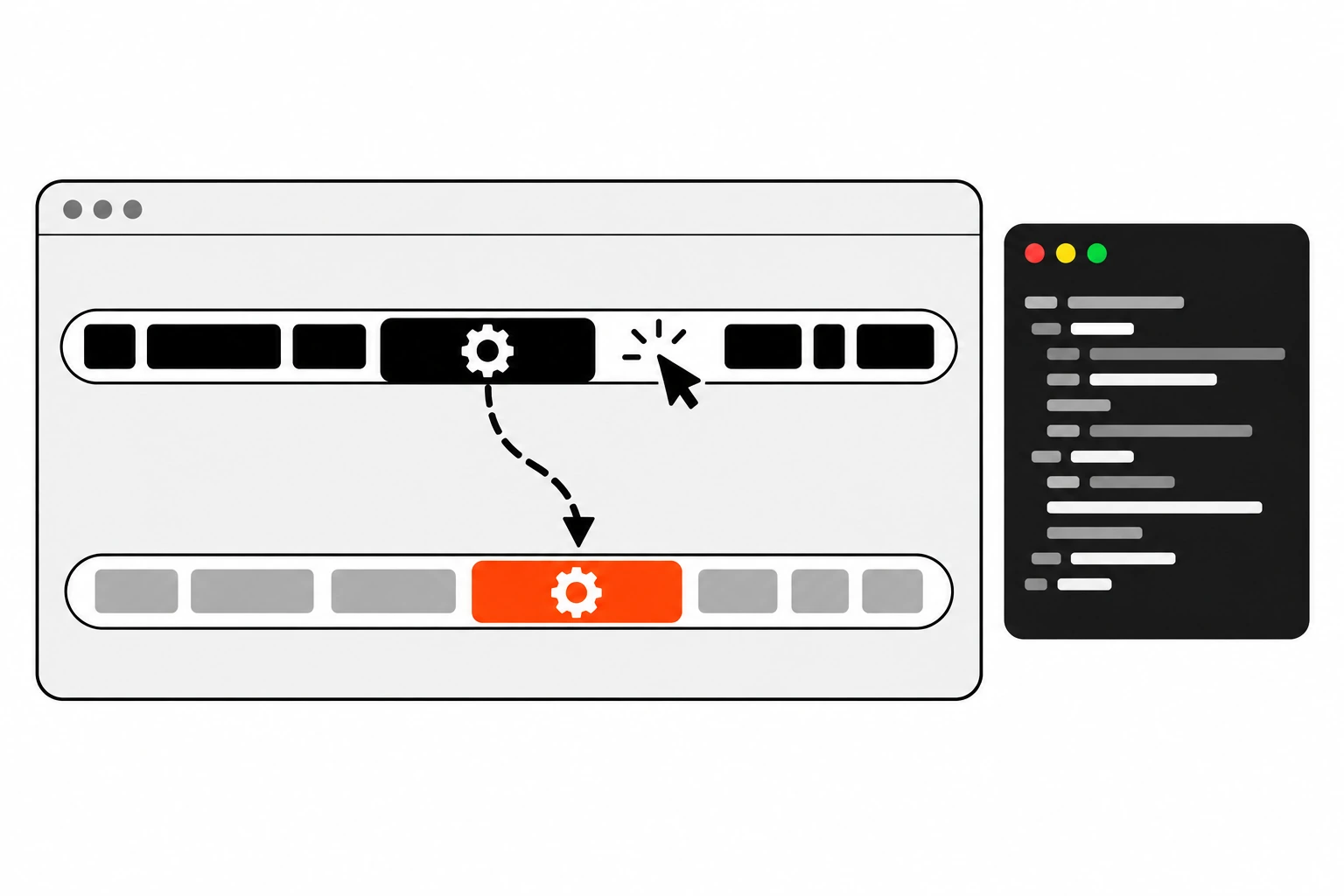
You click a filter button and nothing happens. Half a second later the page jumps, the dropdown opens and closes, and you’ve clicked three more times out of frustration. That’s what a blocked main thread feels like. Web Workers are the browser’s built-in way to run heavy JavaScript somewhere else, so clicks, taps and key presses still get a fast response.
I reach for a worker when I find code that crunches data for hundreds of milliseconds right inside an event handler. This guide covers what a Web Worker is, how to create a module worker, what it costs to send data back and forth, and the cases where a worker is the wrong tool.
Key takeaways
- A Web Worker runs a JavaScript file on a background thread, separate from the main thread that handles input and rendering.
- Long tasks on the main thread delay the next paint after an interaction, which is what hurts your INP score.
- Create a module worker with
new Worker(new URL('./worker.js', import.meta.url), { type: 'module' })and talk to it withpostMessage()andonmessage.- Messages are copied with the structured clone algorithm. For big binary data, transfer the
ArrayBufferinstead of copying it.- Workers can’t touch the DOM. Keep UI updates on the main thread and send only data to the worker.
- For small jobs, breaking work up with
scheduler.yield()is often simpler than a worker.
Short answer: Web Workers let you run CPU-heavy JavaScript, like parsing, sorting, filtering or image processing, on a background thread. The main thread stays free to respond to input, which keeps interactions fast and protects your INP. You send data in with postMessage(), do the work in the worker, and post the result back.
What is a Web Worker?
A Web Worker is a JavaScript script that the browser runs on a separate background thread. It has its own global scope, its own event loop and no access to the DOM. The page and the worker communicate only by sending messages, so heavy work in the worker doesn’t block clicks, typing or rendering on the page.
The MDN guide to using Web Workers describes them as a simple way to run scripts in background threads. That’s really all they are. You give the browser a file, it starts a new thread, runs the file there, and gives you a Worker object to talk to it.
There are a few kinds of workers, and people mix them up:
- Dedicated workers belong to the page that created them. This post is about these.
- Shared workers can be used by several tabs or iframes from the same origin.
- Service workers sit between your site and the network for caching, offline support and push. They’re a different tool with a different job.
Inside a dedicated worker, the global object is self, a DedicatedWorkerGlobalScope, not window. The HTML specification’s workers section defines all of this, if you ever want the exact rules.
Why do long tasks hurt INP?
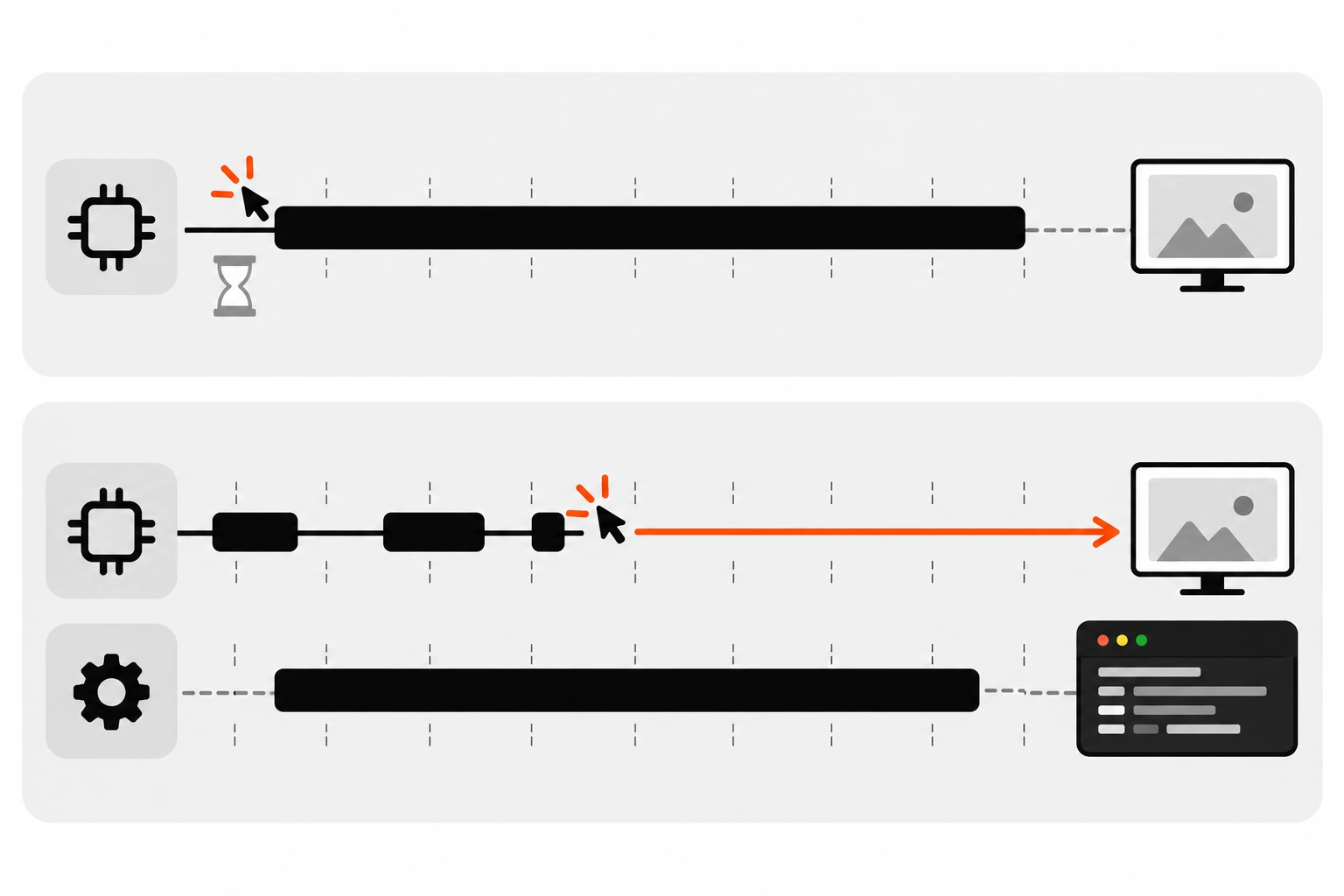
The main thread does one thing at a time. When a click lands while a long JavaScript task is running, the browser can’t run your handler or paint the next frame until that task finishes. INP measures that delay from interaction to next paint, so long tasks push your score up.
Interaction to Next Paint looks at clicks, taps and key presses across the whole visit. Per web.dev’s INP guide, 200 milliseconds or less is good, and anything above 500 milliseconds is poor. Each interaction has three parts: input delay, processing time and presentation delay.
A long task is any task that keeps the main thread busy for more than 50 milliseconds. Long tasks hurt in two ways:
- If one is already running when the user clicks, the click waits. That’s input delay.
- If your click handler itself does the heavy work, the next paint waits for it. That’s processing time.
Moving work into a worker fixes both, because the heavy code is no longer on the main thread at all. If you want the full picture of how INP is scored and debugged, I covered it in my guide to INP and Core Web Vitals.
How do I create a Web Worker?
Create a separate file for the worker code, then start it from the page with new Worker(new URL('./worker.js', import.meta.url), { type: 'module' }). The type: 'module' option makes it a module worker, so it can use import and export. The new URL() pattern lets bundlers find the file and resolve its path.
Here’s the smallest useful setup. First the worker file:
// worker.js
self.onmessage = (event) => {
  const { items, query } = event.data;

  // Heavy work happens here, off the main thread.
  const q = query.toLowerCase();
  const results = items.filter((item) =>
    item.name.toLowerCase().includes(q)
  );

  self.postMessage({ count: results.length, results });
};
Then the page:
// main.js
const worker = new Worker(
  new URL('./worker.js', import.meta.url),
  { type: 'module' }
);

worker.onmessage = (event) => {
  const { count, results } = event.data;
  renderResults(results); // DOM work stays on the main thread
  console.log(`Found ${count} matches`);
};

searchInput.addEventListener('input', () => {
  worker.postMessage({ items: allItems, query: searchInput.value });
});
A few things worth knowing here:
- Module workers are supported in all current major browsers. Inside one, use
import. The oldimportScripts()function only works in classic workers. - The worker file has to come from the same origin as the page.
- Starting a worker isn’t free. The browser has to fetch, parse and start the script on a new thread. Create it once and reuse it, rather than spinning one up per click.
You can also give a worker a name with { type: 'module', name: 'search' }, which makes it easier to spot in DevTools.
How do postMessage and onmessage work?
postMessage() sends a copy of some data to the other side, and the message event delivers it there as event.data. The page calls worker.postMessage() and listens on the worker object. Inside the worker, you call self.postMessage() and listen on self. It’s asynchronous, so the sender never waits for a reply.
Because messages are fire and forget, you need your own way to match a reply to its request. I usually send an id with every message and wrap the whole thing in a promise:
// main.js
let nextId = 0;
const pending = new Map();

worker.addEventListener('message', (event) => {
  const { id, result, error } = event.data;
  const job = pending.get(id);
  if (!job) return;
  pending.delete(id);
  error ? job.reject(new Error(error)) : job.resolve(result);
});

export function runInWorker(type, payload) {
  const id = nextId++;
  return new Promise((resolve, reject) => {
    pending.set(id, { resolve, reject });
    worker.postMessage({ id, type, payload });
  });
}
Now await runInWorker('search', { query }) reads like a normal async call. If you write TypeScript, describe each message as a union with a type field. The pattern from my post on TypeScript discriminated unions fits worker messages really well, because the compiler checks every message shape on both sides.
What does structured clone cost?
Every message is copied with the structured clone algorithm. The sending thread serializes the data and the receiving thread rebuilds it. For small objects that’s cheap. For large arrays or deeply nested JSON, the copy itself can take long enough to become a long task on the main thread.
That second point surprises people. You move the work into a worker, then post a huge object to it, and the main thread still stutters. The serialization happens inside the postMessage() call, on the thread that sends it.
Structured clone also has rules about what it can copy:
- Plain objects, arrays, strings, numbers,
Map,Set,Date,Blob, typed arrays andArrayBuffercopy fine. - Functions and DOM nodes can’t be cloned. Trying throws a
DataCloneError. - Class instances arrive as plain objects. Their methods and prototype don’t come along.
So keep messages lean. Send the worker the data it needs once, keep it there, and send small queries after that. In the search example above, I’d post allItems a single time when the data loads, then send only the query string on each keystroke.
How do Transferable objects speed up postMessage?
A transferable object is moved to the other thread instead of copied. You list it in the second argument, like worker.postMessage(buffer, [buffer]). For an ArrayBuffer, the memory changes owner with no copy, and the original becomes detached, with a byteLength of 0 on the sending side.
This is the fix when you’re dealing with big binary data like images, audio or file contents:
// main.js
const file = fileInput.files[0];
const buffer = await file.arrayBuffer();

// Move the memory to the worker instead of copying it.
worker.postMessage({ type: 'parse', buffer }, [buffer]);

console.log(buffer.byteLength); // 0, it now belongs to the worker
And back the other way, from the worker:
// worker.js
self.onmessage = (event) => {
  const output = processBytes(event.data.buffer); // returns a Uint8Array
  self.postMessage({ type: 'done', output }, [output.buffer]);
};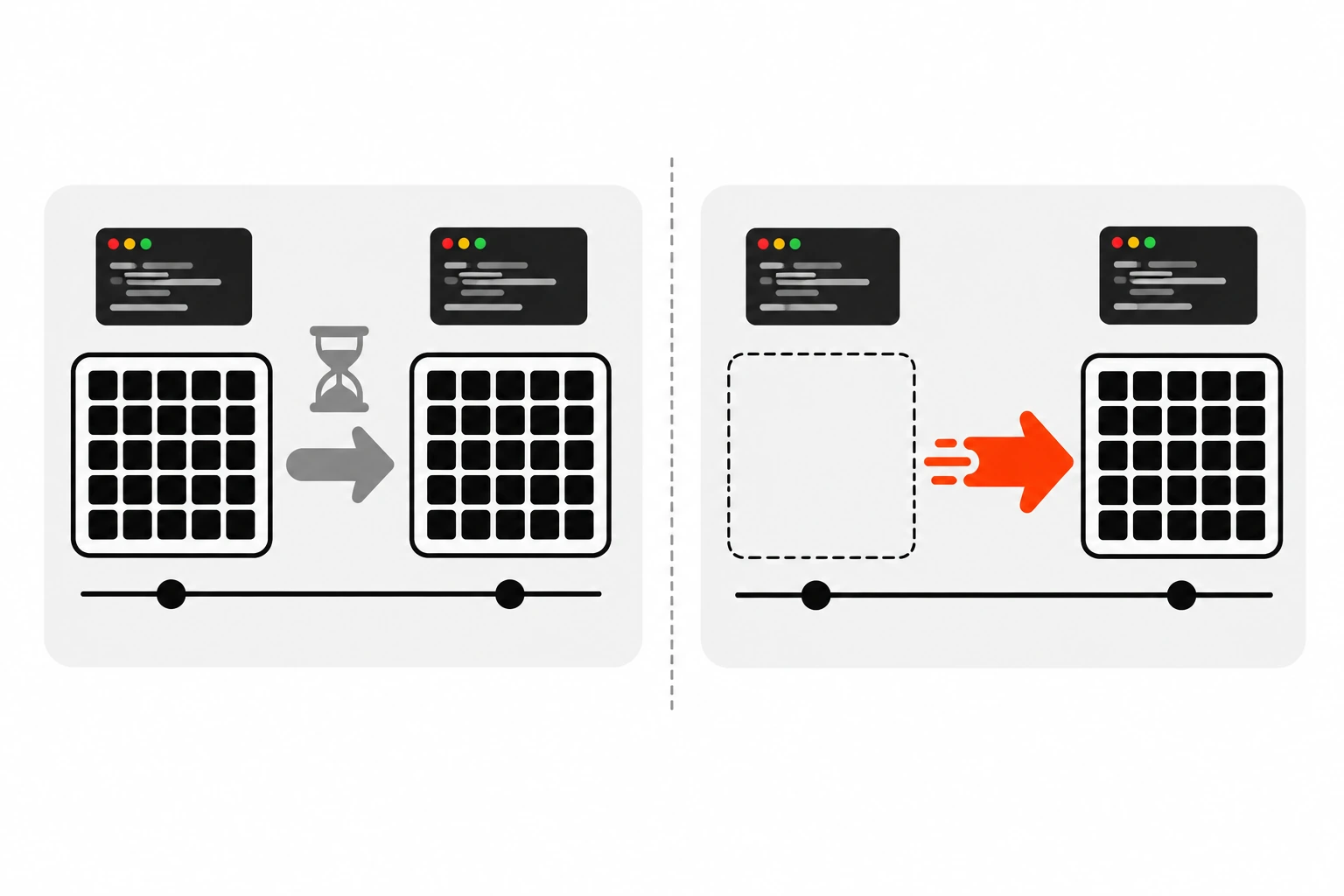
Two details trip people up. Typed arrays like Uint8Array are not transferable themselves, so you list their .buffer in the transfer list. And once transferred, the original buffer is unusable, so don’t read it afterwards. The MDN page on transferable objects lists the other types you can move, including MessagePort, ImageBitmap, OffscreenCanvas and ReadableStream.
You’ll also see SharedArrayBuffer mentioned. It lets two threads read and write the same memory, but it only works when the page is cross-origin isolated with the right COOP and COEP headers. For most apps, transferring is enough.
What can’t a Web Worker do?
A Web Worker can’t access the DOM. There’s no document and no window, and you can’t read or change elements, styles or layout from inside one. localStorage isn’t available either. Workers are for computation and I/O, and the main thread stays in charge of anything the user sees.
Here’s what you do get inside a worker:
fetch(),WebSocketandIndexedDB- Timers like
setTimeout()andsetInterval() - The Web Crypto API through
self.crypto OffscreenCanvas, if you want to draw off the main threadimportin module workers, so you can share utility code with the page
What you don’t get is anything tied to the page itself. A worker can’t update a progress bar. It can post a message that says ’40 percent done’, and the main thread updates the bar. That split is the whole design, and once you accept it, workers get much easier to reason about.
When should you not use a Web Worker?
Skip a worker when the work is quick, when it’s mostly DOM updates, or when the data is so large that copying it costs more than processing it. Workers add a file, a message protocol and startup cost. If a task takes a few milliseconds, that overhead isn’t worth it.
The cases where I don’t bother:
- Slow rendering. If the slow part is React re-rendering 5,000 rows, a worker can’t help, because rendering has to happen on the main thread. Virtualize the list or render less.
- Network waits. A slow
fetch()isn’t blocking the main thread. It’s waiting. Workers won’t make it faster. Cancelling stale requests with an AbortController often helps more. - Tiny jobs. Sorting 50 items takes no time. Just do it.
- Work that needs the DOM at every step. If you’d be posting messages back and forth on every iteration, the messaging becomes the bottleneck.
The good candidates are pure functions over data: parsing big CSV or JSON files, search and filtering over large lists, diffing, compression, image processing, syntax highlighting, and heavy math. Measure first. The Performance panel in Chrome DevTools shows long tasks with a red corner, and if the long task is your own function doing math, that’s a worker candidate.
Web Workers vs scheduler.yield vs requestIdleCallback: which should you use?
Use scheduler.yield() to split main-thread work into small chunks so input can slip in between. Use requestIdleCallback() for low-priority work that can wait until the browser is idle. Use a Web Worker when the work is heavy, pure computation that would still block the thread even after chunking.
Here’s how I think about the options:
| Approach | Where code runs | DOM access | Best for | Watch out for |
|---|---|---|---|---|
| Plain main thread | Main thread | Yes | Quick work under a few milliseconds | Anything over 50 ms becomes a long task |
scheduler.yield() | Main thread, in chunks | Yes | Long loops you can split, work that touches the DOM | Not Baseline yet, so feature-check it |
requestIdleCallback() | Main thread, when idle | Yes | Analytics, prefetching, non-urgent cleanup | Can wait a long time on a busy page |
| Web Worker | Background thread | No | Heavy parsing, filtering, math, image work | Message copying cost and startup cost |
scheduler.yield() is part of the Prioritized Task Scheduling API. MDN marks it as limited availability, so check for it first and fall back to a setTimeout() yield:
function yieldToMain() {
  if (globalThis.scheduler?.yield) return scheduler.yield();
  return new Promise((resolve) => setTimeout(resolve, 0));
}

for (const chunk of chunks) {
  processChunk(chunk);
  await yieldToMain();
}
web.dev’s guide on optimizing long tasks goes deeper on yielding. In practice I often use both: yield in UI code, and push the truly heavy number crunching into a worker.
How do I use Web Workers with Vite, webpack and Next.js?
Vite, webpack 5 and Next.js all recognize new Worker(new URL('./worker.js', import.meta.url)). They bundle the worker file as its own chunk and rewrite the URL for production. Keep the new URL() call written directly inside new Worker(), because the bundler finds workers by reading that exact pattern.
Some specifics:
- Vite documents the constructor pattern as the recommended way. It also supports importing with a
?workersuffix, likeimport MyWorker from './worker?worker', which gives you a constructor. With the constructor pattern, the options must be static values. - webpack 5 supports the
new URL()pattern natively, so you don’t need the old worker-loader plugin. - Next.js works with the same pattern under webpack and Turbopack. The catch is that
Workerdoesn’t exist on the server, so create it in a client component insideuseEffect.
A Next.js client component looks like this:
'use client';
import { useEffect, useRef } from 'react';

export default function Search() {
  const workerRef = useRef(null);

  useEffect(() => {
    const worker = new Worker(
      new URL('../workers/search.worker.js', import.meta.url),
      { type: 'module' }
    );
    workerRef.current = worker;
    worker.onmessage = (event) => {
      // update React state with event.data
    };
    return () => worker.terminate();
  }, []);

  // ...
}
The cleanup function matters. In development, React Strict Mode runs effects twice, and without terminate() you’d leak a worker. If you’ve ever hit ‘window is not defined’ in Next.js, it’s the same server versus browser split I described in my post on the React hydration error in Next.js.
How do I handle errors in a Web Worker?
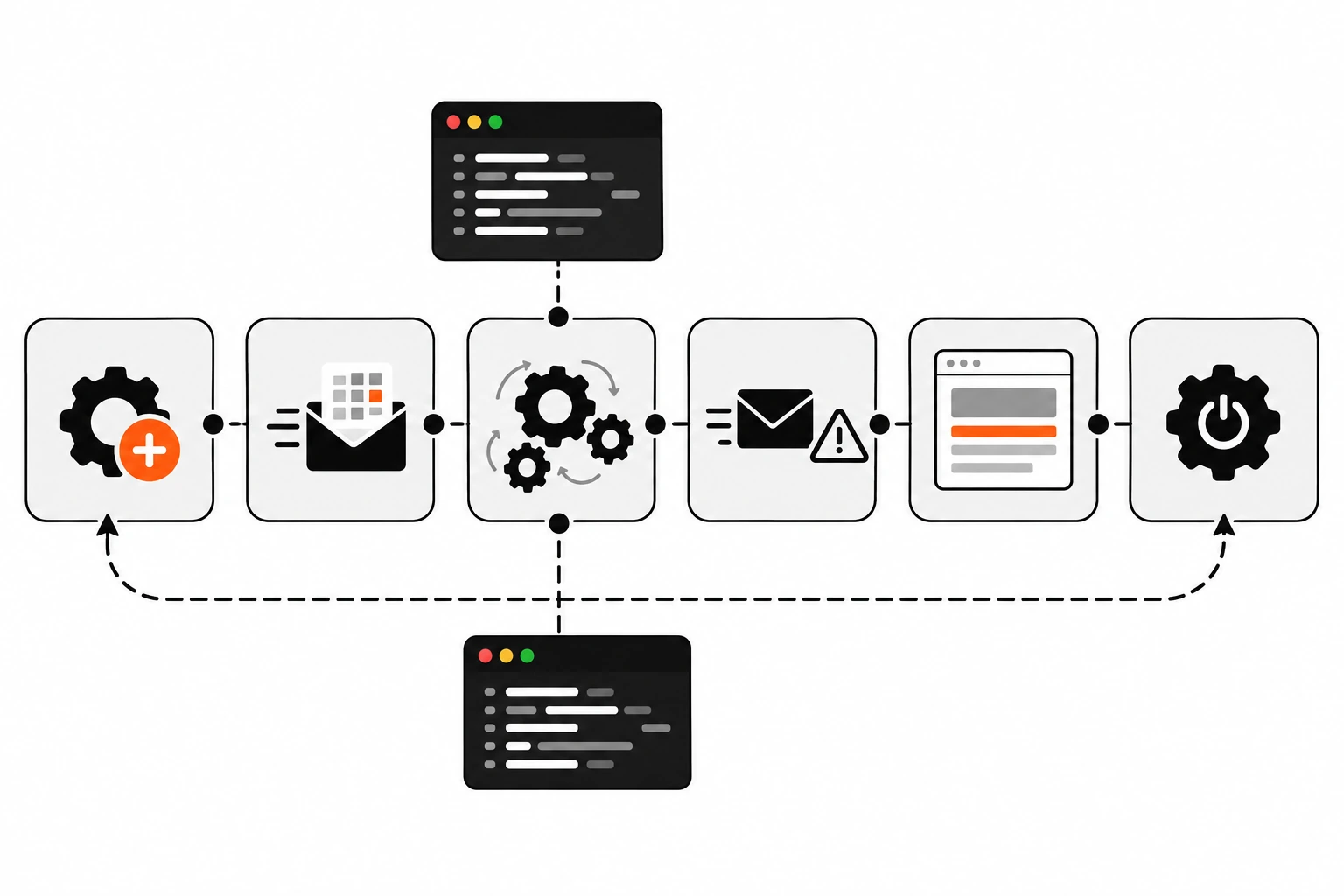
Listen for the error event on the worker object. It fires when the worker script fails to load or throws an uncaught exception, and the ErrorEvent includes message, filename and lineno. Also listen for messageerror, which fires when a message can’t be deserialized. Inside the worker, catch errors and post them back.
An uncaught error in a worker doesn’t crash your page, but it doesn’t show up in your normal error handling either. It’s easy for a broken worker to fail silently. I handle it on both sides:
// main.js
worker.addEventListener('error', (event) => {
  console.error('Worker error:', event.message, event.filename, event.lineno);
});

worker.addEventListener('messageerror', () => {
  console.error('A message could not be deserialized');
});
// worker.js
self.onmessage = (event) => {
const { id, payload } = event.data;
try {
const result = heavyWork(payload);
self.postMessage({ id, result });
} catch (err) {
self.postMessage({ id, error: err.message });
}
};Posting the error back with the same id lets the promise wrapper from earlier reject properly, so the calling code can show a message instead of hanging forever. It’s also worth covering the worker path in an end-to-end test. A quick Playwright check that the search results appear will catch a worker that silently failed to load.
How do I terminate a Web Worker?
Call worker.terminate() from the page to stop the worker immediately. It doesn’t wait for running work to finish and doesn’t let the worker clean up. From inside the worker, call self.close() to shut it down. Terminate workers you no longer need, because each one holds its own thread and memory.
Terminating is also a handy way to cancel. If a user types a new search while the old one is still running in the worker, you can terminate it and start a fresh worker instead of waiting. For long jobs that’s often simpler than building cancellation messages into the worker.
The usual places I call terminate():
- When the component or page section that owns the worker unmounts
- When a job is cancelled and restarting is cheaper than waiting
- After a one-off task, like parsing a single uploaded file
Should you use Comlink with Web Workers?
Comlink is a small library from Google Chrome Labs that wraps postMessage() so calling a worker feels like calling an async function. You expose() an object in the worker and wrap() the worker on the page. It’s optional, but it removes most of the message plumbing from the earlier examples.
// worker.js
import * as Comlink from 'comlink';

const api = {
  search(items, query) {
    const q = query.toLowerCase();
    return items.filter((item) => item.name.toLowerCase().includes(q));
  },
};

Comlink.expose(api);
// main.js
import * as Comlink from 'comlink';
const worker = new Worker(new URL('./worker.js', import.meta.url), {
type: 'module',
});
const api = Comlink.wrap(worker);
const results = await api.search(allItems, 'shoes');Under the hood it’s still postMessage() and structured clone, so the same rules about copy cost apply. Comlink has Comlink.transfer() for when you want to transfer instead of copy. I’d learn the raw API first, then reach for Comlink once you have more than two or three message types.
Are Web Workers worth it for INP?
Yes, when your slow interactions come from your own heavy JavaScript. Moving parsing, filtering or number crunching into a worker takes it off the main thread completely, so input gets handled and the next frame gets painted. If the slow part is rendering or network, fix that instead.
If you want one thing to try this week, open the Performance panel, record a slow interaction on your site, and look at the longest task. If it’s mostly your own function doing math or data work, move that function into a module worker. Post the data in once, keep messages small, transfer big buffers, and terminate the worker when you’re done.
And if the long task turns out to be rendering? That’s useful to know too. It tells you a worker isn’t the answer, and you can stop guessing.